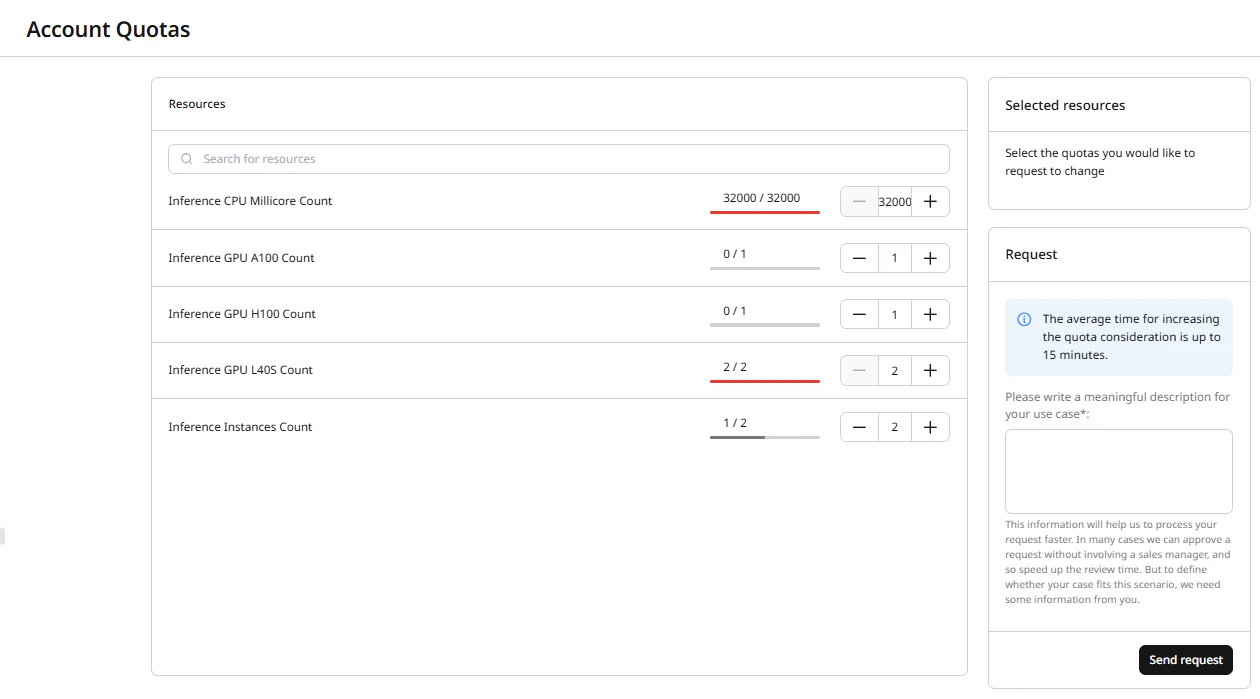
New Gcore accounts start with a zero quota for Everywhere Inference. A quota increase is required before creating deployments. The Quotas section has two pages:Documentation Index
Fetch the complete documentation index at: https://gcore.com/docs/llms.txt
Use this file to discover all available pages before exploring further.
- Quotas Viewer — view current resource limits and submit quota increase requests.
- Quotas Request History — track the status of submitted requests.
Quota increase request
The Quotas Viewer lists all available resource types alongside current usage and quota limit. Requests are processed in up to 15 minutes.Step 1. Quotas Viewer
In the Gcore Customer Portal, navigate to Everywhere Inference > Quotas > Quotas Viewer. The page shows all available quota resources and their current usage:- Inference CPU Millicore Count — total vCPU millicores allocated across all deployments.
- Inference GPU A100 Count — number of A100 GPUs.
- Inference GPU H100 Count — number of H100 GPUs.
- Inference GPU L40S Count — number of L40S GPUs.
- Inference Instances Count — total number of deployments.